Campaigns on FirstQuadrant
Campaigns connected the audience work to actual outbound. A campaign took a qualified audience, drafted emails in the sender’s voice, sent them through connected mailboxes, and pushed replies into Actions for review. That was the path from a cold list to a real sales conversation.
The campaign overview had to be quick to scan. Each campaign showed status, progress, and counts for contacts that were completed, running, sequenced, or still pending. Starting a campaign was blocked until the basics were in place: an active subscription, at least one sender, an audience, a variant, and a sequence step. Pausing could be gentle, letting already-started sequences continue, or hard, stopping running sequences and scheduled drafts.

Editing a campaign worked like a checklist. The main sections were Senders, Audience, and Sequence. Advanced settings covered Pipelines, Product or service, and Sending schedule. It was clear what needed attention before the campaign could move from draft to running.
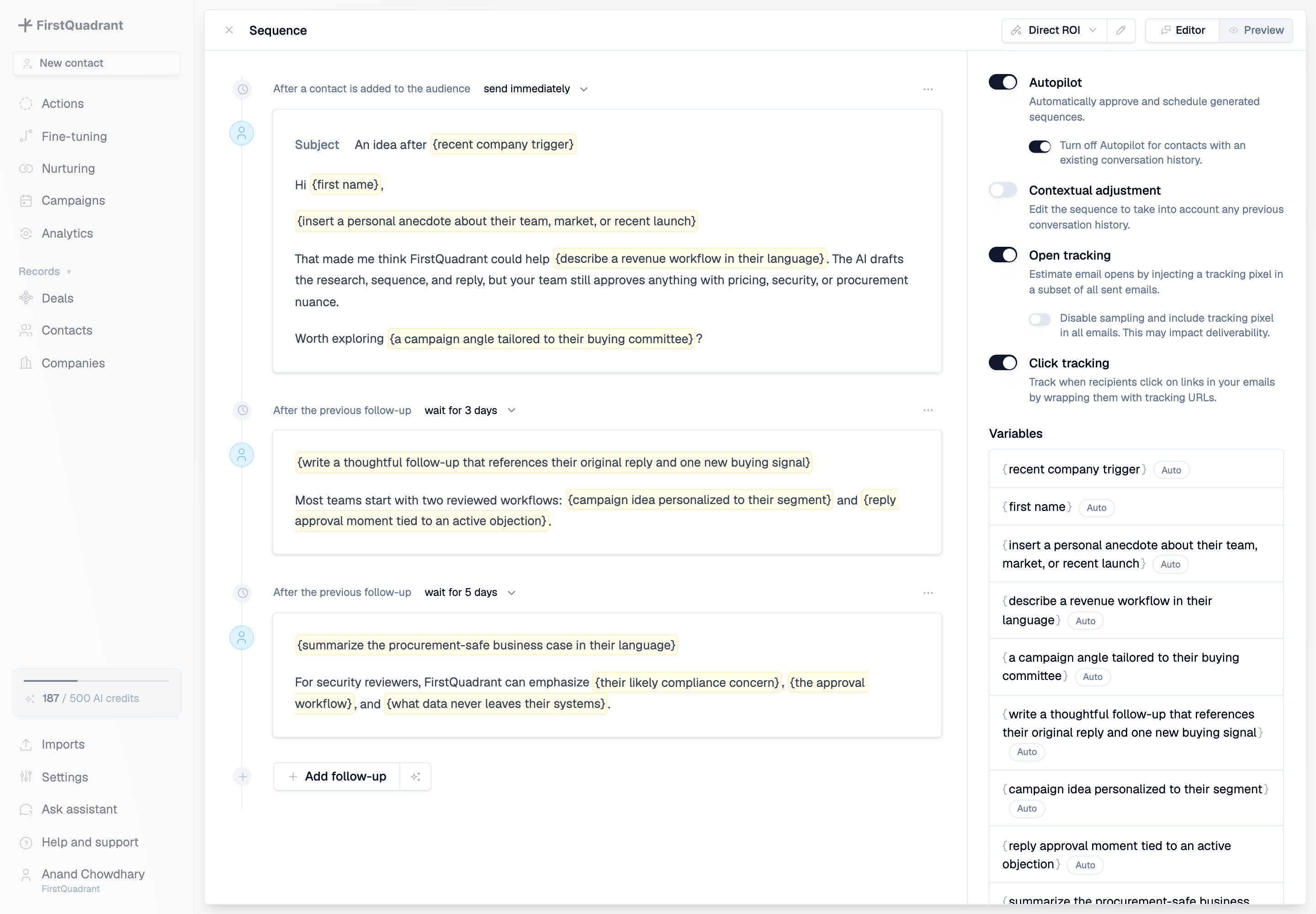
The sequence editor was where the product felt furthest from old mail merge tools. The yellow variables were instructions written into the template, like “insert a personal anecdote about their team, market, or recent launch.” Each variable could have its own length setting and example, so the model knew whether to write a two-word phrase, a short sentence, or a fuller contextual note.


Audience management kept campaigns tied to the CRM. Campaigns could pull from saved contact views and imports, then show every generated sequence with its status. Opening an audience row showed the same contact panel used elsewhere, with contact details, company details, enrichment, custom properties, related deals, and activity history.
The model used the whole campaign context: sender identity, recipient and company context, qualification answers, custom properties, product details, and earlier steps in the sequence. Follow-ups knew what had already been sent, instead of acting like separate templates stitched together by date.
Deliverability took a lot of the real product work. We supported Google Workspace, Microsoft 365, Exchange, Zoho, and IMAP mailboxes, plus outbound-specific accounts. Campaigns could use the workspace sending schedule or define their own weekday windows and recipient-time-zone behavior. Product details and pipelines worked the same way: use the workspace defaults most of the time, override them when a campaign needed a specific offer, schedule, or conversion pipeline.


Pipeline targeting made campaign results visible. When someone replied positively, FirstQuadrant could create or associate deals in the selected pipeline and show conversion in analytics. Prospecting created the audience, campaigns handled the outreach, actions handled the replies, and analytics showed whether the work created pipeline.
Campaigns kept growing after the first release. We added language support, richer variables, mailbox management, HTML email handling, unsubscribe logic, campaign analytics, variants, autopilot, and deeper CRM attribution. For a while, the Monday changelog rhythm became part of the product.
Additional product views
Campaigns depended on the surrounding infrastructure: connected mailboxes for sending, calendars for meeting detection, and workspace-level schedules that kept outbound inside sane delivery windows.
Member settings mattered too, because campaigns borrowed identity from real senders. Scheduling links, signatures, reply-to addresses, and active status all shaped what the recipient saw and where replies went.


